
💜 Qwen Chat | 🤗 Hugging Face | 🖥️ Demo | 📑 Tech Report | 🐙 Github
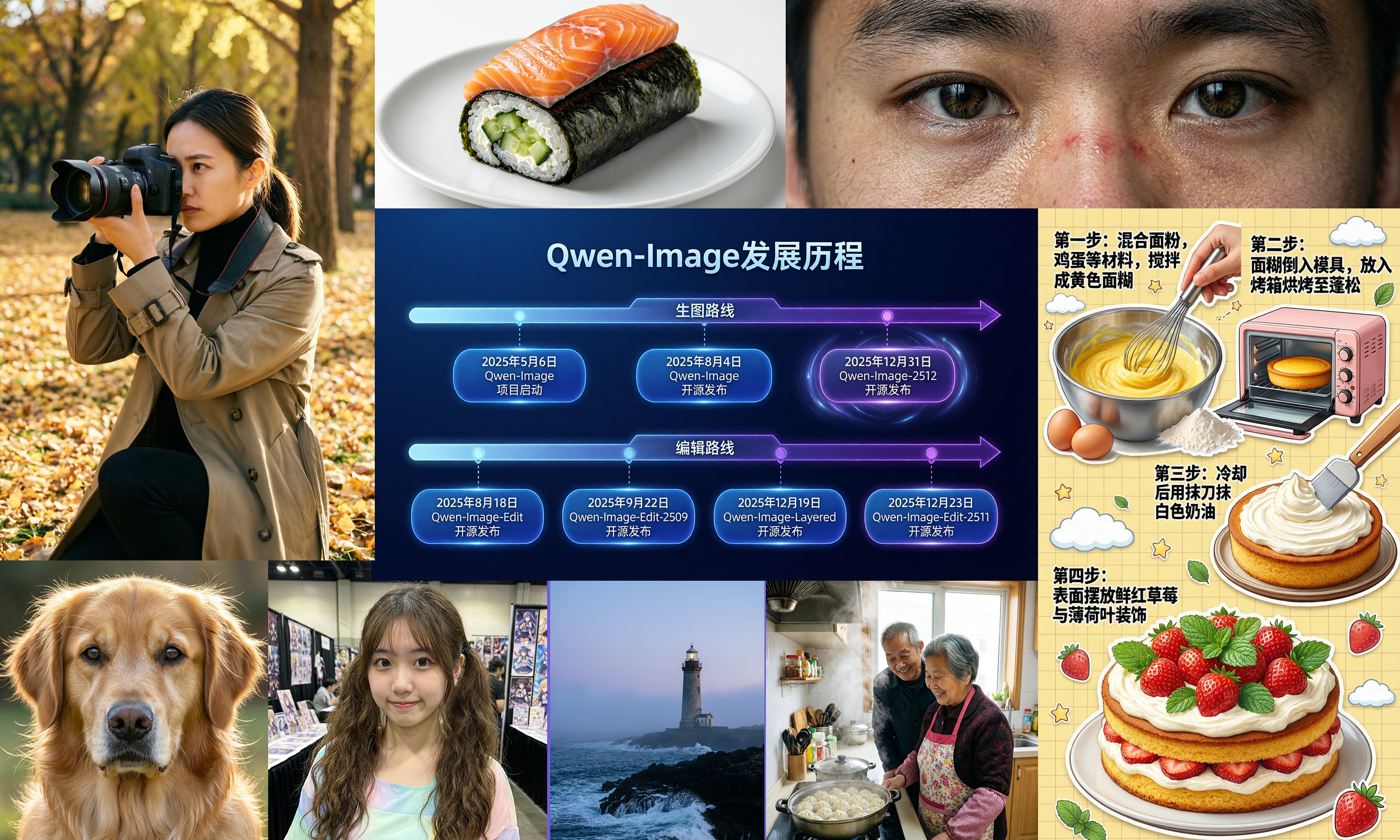
🚀 Qwen-Image-2512: A New Standard for AI Image Generation
Qwen-Image-2512 is the latest text-to-image generation model developed by Alibaba Cloud, an updated version of the Qwen-Image series released in December 2025. It features significantly improved human realism, natural details, and text rendering capabilities compared to the previous August version.
Qwen-Image-2512 is available as open source, allowing anyone to use it for free. It has undergone over 10,000 blind tests on AI Arena and is currently evaluated as the most powerful open-source image generation model. It demonstrates competitive performance even compared to commercial models.
Text-to-image models are AI models that generate images from text prompts. Simply put, when you input "a young woman walking on the beach at sunset," the AI imagines that scene and renders it as an image.
🎯 Three Key Improvements
1. Enhanced Human Realism
The most significant feature of Qwen-Image-2512 is that it has drastically reduced the "AI feel" and revolutionarily improved human realism. Unnatural facial expressions, lack of skin detail, and artificial feelings present in the previous version have been greatly improved.
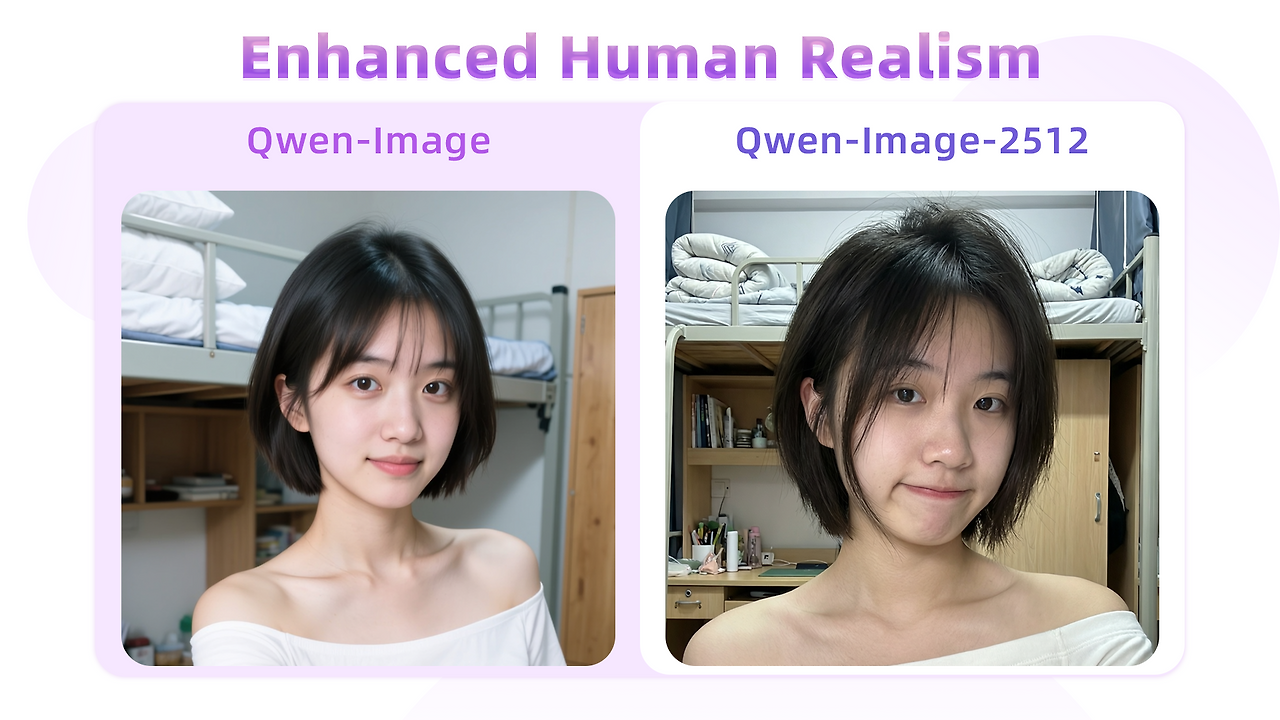
💡 Real Improvement Example: When generating an image of a 20-year-old East Asian girl, previous versions tended to render hair in clumps, but Qwen-Image-2512 renders each strand of hair with exquisite detail, showing much more natural results.
In particular, it can more accurately express facial details, skin texture, natural expressions, and age characteristics (wrinkles, etc.), achieving quality levels that are difficult to distinguish from real photographs.
2. More Refined Natural Details
Not only humans but also the details of landscapes, animal fur, and natural elements have been greatly improved. Waterfall ripples, plants in dense forests, and animal fur textures can be expressed much more delicately and vividly than before.

💡 Golden Retriever Example: When rendering a Golden Retriever's fur, it renders the long guard hairs on the outside and the soft undercoat on the inside with different textures, and naturally expresses even the light reflecting off the tips of the fur.
3. Improved Text Rendering
The ability to render text within images has also been greatly improved. When generating content that mixes text and images, such as PPT slides, posters, and infographics, text accuracy, layout, and overall quality have improved.

💡 Complex Infographic Generation: It can accurately generate complex content that combines various visual elements and text, such as industrial technology infographics. It can even generate entire educational posters at once.
📊 Performance Comparison: AI Arena Blind Test
To objectively verify Qwen-Image-2512's performance, we conducted over 10,000 blind model evaluations on AI Arena. As a result, Qwen-Image-2512 was confirmed as the most powerful open-source model currently available, showing competitive performance even compared to commercial closed models.
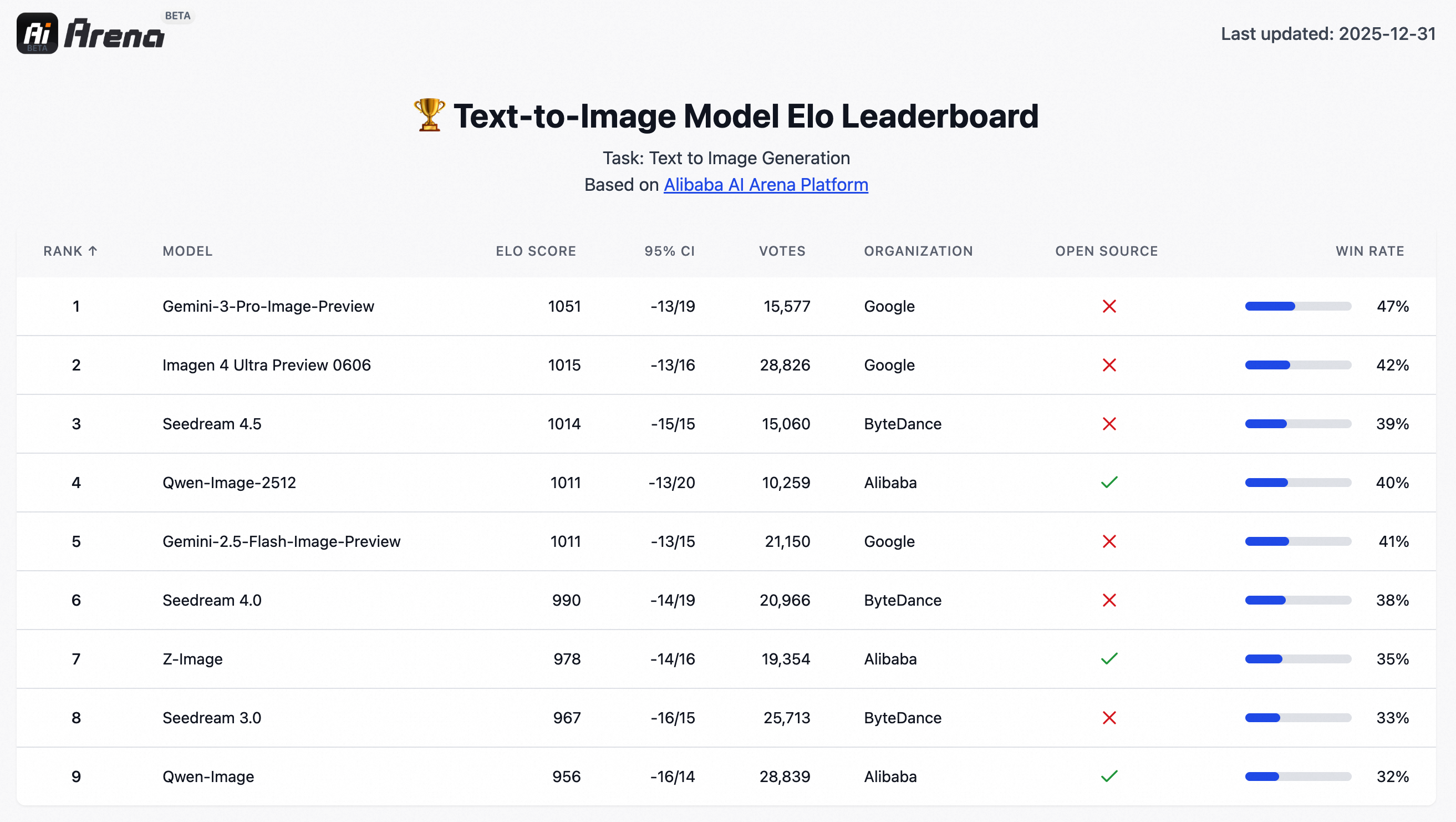
▲ Qwen-Image-2512 Performance on AI Arena (Click to enlarge)
What is a blind test? It's a method where evaluators assess image quality without knowing which model generated the image. This allows for objective measurement of model performance.
💻 Practical Usage Guide: From Installation to Execution
Now let's actually use Qwen-Image-2512 to generate images. You can get started easily using Python and the diffusers library.
Step 1: Install Required Libraries
First, you need to install the latest version of the diffusers library. Run the following command in your terminal:
pip install git+https://github.com/huggingface/diffusers⚠️ Hardware Requirements: Qwen-Image-2512 performs best in an environment with a GPU. If you don't have an NVIDIA GPU, you can run it on CPU, but it will be very slow. We recommend using Google Colab or a local GPU environment.
Step 2: Generate Images with Python Code
Now let's write Python code to actually generate images:
from diffusers import DiffusionPipeline
import torch

# Set model name
model_name = "Qwen/Qwen-Image-2512"

# Check GPU availability
if torch.cuda.is_available():
    torch_dtype = torch.bfloat16  # Use bfloat16 for GPU (faster)
    device = "cuda"
    print(f"✅ Running in GPU mode: {torch.cuda.get_device_name(0)}")
else:
    torch_dtype = torch.float32  # Use float32 for CPU
    device = "cpu"
    print("⚠️ Running in CPU mode. Speed may be slow.")

# Load pipeline
print(f"📦 Loading model '{model_name}'...")
pipe = DiffusionPipeline.from_pretrained(model_name, torch_dtype=torch_dtype).to(device)
print("✅ Model loading complete!")

# Set prompt
prompt = '''A 20-year-old East Asian girl with delicate, charming features and large,
bright brown eyes—expressive and lively, with a cheerful or subtly smiling expression.
Her naturally wavy long hair is either loose or tied in twin ponytails. She has fair skin
and light makeup accentuating her youthful freshness. She wears a modern, cute dress or
relaxed outfit in bright, soft colors—lightweight fabric, minimalist cut. She stands
indoors at an anime convention, surrounded by banners, posters, or stalls. Lighting is
typical indoor illumination—no staged lighting—and the image resembles a casual iPhone
snapshot: unpretentious composition, yet brimming with vivid, fresh, youthful charm.'''

# Negative prompt (unwanted elements)
negative_prompt = "low resolution, low quality, deformed limbs, deformed fingers, oversaturated, wax-like face, no facial details, overly smooth, AI-generated look. messy composition. blurry text, distorted text."

# Set various aspect ratios
aspect_ratios = {
    "1:1": (1328, 1328),   # Square (Instagram style)
    "16:9": (1664, 928),  # Landscape (YouTube thumbnail style)
    "9:16": (928, 1664),  # Portrait (mobile style)
    "4:3": (1472, 1104),  # Standard digital camera ratio
    "3:4": (1104, 1472),
    "3:2": (1584, 1056),  # Classic photo ratio
    "2:3": (1056, 1584),
}

# Select desired ratio (e.g., 16:9)
width, height = aspect_ratios["16:9"]

print(f"🎨 Generating image... (size: {width}x{height})")
print(f"📝 Prompt: {prompt[:100]}...")

# Generate image
image = pipe(
    prompt=prompt,
    negative_prompt=negative_prompt,
    width=width,
    height=height,
    num_inference_steps=50,    # Number of inference steps (higher = better quality but slower)
    true_cfg_scale=4.0,        # CFG scale (how much to follow the prompt)
    generator=torch.Generator(device=device).manual_seed(42)  # Random seed
).images[0]

# Save image
output_path = "qwen_image_example.png"
image.save(output_path)
print(f"✅ Image saved to '{output_path}'!")
Step 3: Various Prompt Examples
Here are tips and examples for writing prompts to get good results:
✨ Core Prompt Writing Tips
- Specificity: Instead of "pretty woman," use "20-year-old East Asian woman, brown eyes, natural smile, casual dress"
- Environment Description: Clearly describe indoor/outdoor, lighting, and background
- Style Specification: Use "photorealistic," "illustration," "oil painting style," etc.
- Negative Prompt Usage: Specify unwanted elements like "low quality," "distorted fingers," "excessive saturation"
Example 1: Natural Portrait
# Portrait prompt
prompt = """A Chinese female college student, around 20 years old, with a very short haircut
that conveys a gentle, artistic vibe. Her hair naturally falls to partially cover her cheeks,
projecting a tomboyish yet charming demeanor. She has cool-toned fair skin and delicate features,
with a slightly shy yet subtly confident expression—her mouth crooked in a playful, youthful smirk.
She wears an off-shoulder top, revealing one shoulder, with a well-proportioned figure. The image
is framed as a close-up selfie: she dominates the foreground, while the background clearly shows
her dormitory—a neatly made bed with white linens on the top bunk, a tidy study desk with
organized stationery, and wooden cabinets and drawers. The photo is captured on a smartphone
under soft, even ambient lighting, with natural tones, high clarity, and a bright, lively
atmosphere full of youthful, everyday energy."""

negative_prompt = "low resolution, low quality, deformed limbs, deformed fingers, oversaturated, wax-like face, no facial details, overly smooth, AI-generated look. messy composition. blurry text, distorted text."

# Generate
image = pipe(prompt=prompt, negative_prompt=negative_prompt, width=1328, height=1328, num_inference_steps=50).images[0]
image.save("portrait_example.png")
Example 2: Natural Landscape
# Landscape prompt
prompt = """A turquoise river winds through a lush canyon. Thick moss and dense ferns blanket
the rocky walls; multiple waterfalls cascade from above, enveloped in mist. At noon, sunlight
filters through the dense canopy, dappling the river surface with shimmering light. The atmosphere
is humid and fresh, pulsing with primal jungle vitality. No humans, text, or artificial traces
present. Photorealistic style, high detail, cinematic lighting."""

negative_prompt = "low quality, blurry, distorted, text, watermark, humans, artificial structures"

# Generate (16:9 wide ratio)
image = pipe(prompt=prompt, negative_prompt=negative_prompt, width=1664, height=928, num_inference_steps=50).images[0]
image.save("landscape_example.png")
Example 3: Animal Photo
# Animal photo prompt
prompt = """An ultra-realistic close-up of a golden retriever outdoors under soft daylight.
Hair is exquisitely detailed: strands distinct, color transitioning naturally from warm gold
to light cream, light glinting delicately at the tips; a gentle breeze adds subtle volume.
Undercoat is soft and dense; guard hairs are long and well-defined, with visible layering.
Eyes are moist, expressive; nose is slightly damp with fine specular highlights. Background
is softly blurred to emphasize the dog's tangible texture and vivid expression."""

negative_prompt = "cartoon, painting, low quality, blurry, distorted, extra limbs"

# Generate
image = pipe(prompt=prompt, negative_prompt=negative_prompt, width=1328, height=1328, num_inference_steps=50).images[0]
image.save("animal_example.png")
Step 4: Main Parameter Explanation
| Parameter | Description | Recommended Value |
|---|---|---|
width, height |
Image size (pixels) | 1328×1328 (1:1), 1664×928 (16:9) |
num_inference_steps |
Number of inference steps (higher = better quality ↑ slower ↓) | 30-50 |
true_cfg_scale |
CFG scale (how much to follow the prompt) | 4.0-7.0 |
negative_prompt |
Unwanted elements (negative prompt) | Low quality, distortion, etc. |
generator.manual_seed |
Random seed (reproduce same result) | Any number |
What is CFG Scale? Short for Classifier-Free Guidance Scale, it's a value that controls how strongly the AI follows the prompt. Higher values mean the AI follows the prompt more faithfully, but too high can make the image look unnatural.
🎮 Try It with Web Demo
You can experience Qwen-Image-2512 directly in your web browser without writing code:
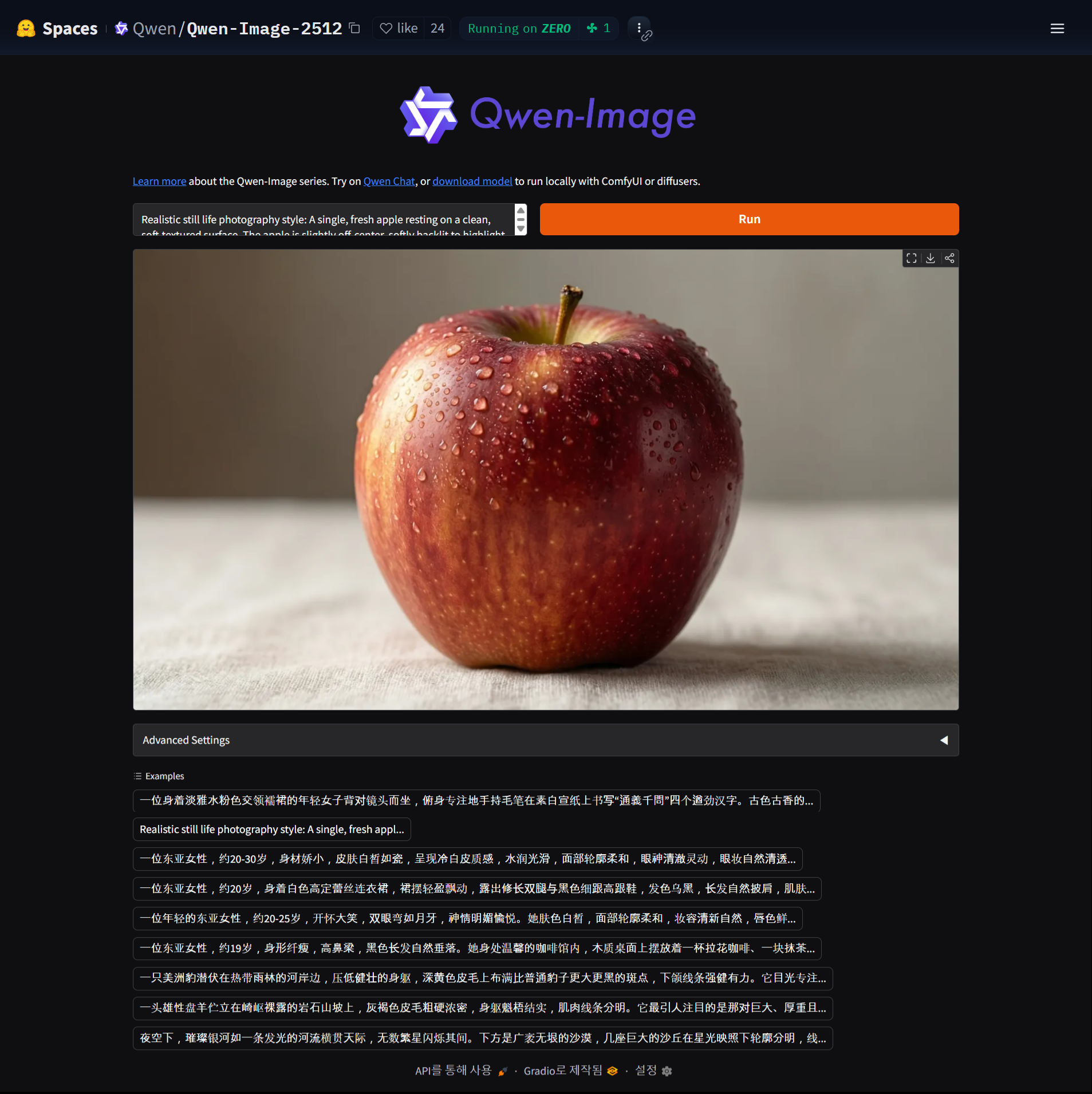
🌐 Hugging Face Spaces: Try it for free at https://huggingface.co/spaces/Qwen/Qwen-Image-2512. You can generate images directly in your browser without any installation.
💜 Qwen Chat: You can also use Qwen-Image-2512 at https://chat.qwen.ai/, which also provides image editing features.
🔍 Comparison with Previous Version
Qwen-Image-2512 has the following improvements compared to the initial Qwen-Image model released in August:
| Improvement Area | Qwen-Image (August) | Qwen-Image-2512 (December) |
|---|---|---|
| Human Realism | Lack of facial detail, AI feel | Improved skin texture, wrinkles, expressions |
| Hair Rendering | Hair rendered in clumps | Individual hair strands rendered precisely |
| Natural Details | Basic landscape, animal rendering | Delicate fur texture, ripples, mist rendering |
| Text Rendering | Basic text generation | Can generate complex infographics, posters |
| Prompt Following | Basic prompt understanding | Follows complex poses, specific instructions |
🎯 Summary and Conclusion
Qwen-Image-2512 sets a new standard for open-source text-to-image generation models. It shows revolutionary improvements particularly in three areas: human realism, natural details, and text rendering.
✅ Key Advantages of Qwen-Image-2512
- Open Source: Free to use, commercial use also possible (check license)
- High Quality: Image quality that competes with commercial models
- Various Aspect Ratios: Supports 1:1, 16:9, 9:16 and more
- Multi-language Support: Understands prompts in various languages (English recommended)
- Easy Installation: Simple installation and use with diffusers library
Qwen-Image-2512 will be a powerful tool for developers, designers, and content creators in the AI image generation field. As an open-source project, we can expect continuous updates and community contributions.
📚 Additional Learning Resources
I recommend you visit Hugging Face Spaces or Qwen Chat to try generating images with Qwen-Image-2512. With good prompts, you can create images of quality comparable to commercial image generation services for free. Thank you.


